


Ultra 'Elevate' Silver Diffuser
Luxury Scenting. Intelligent Control. Elevated Living.
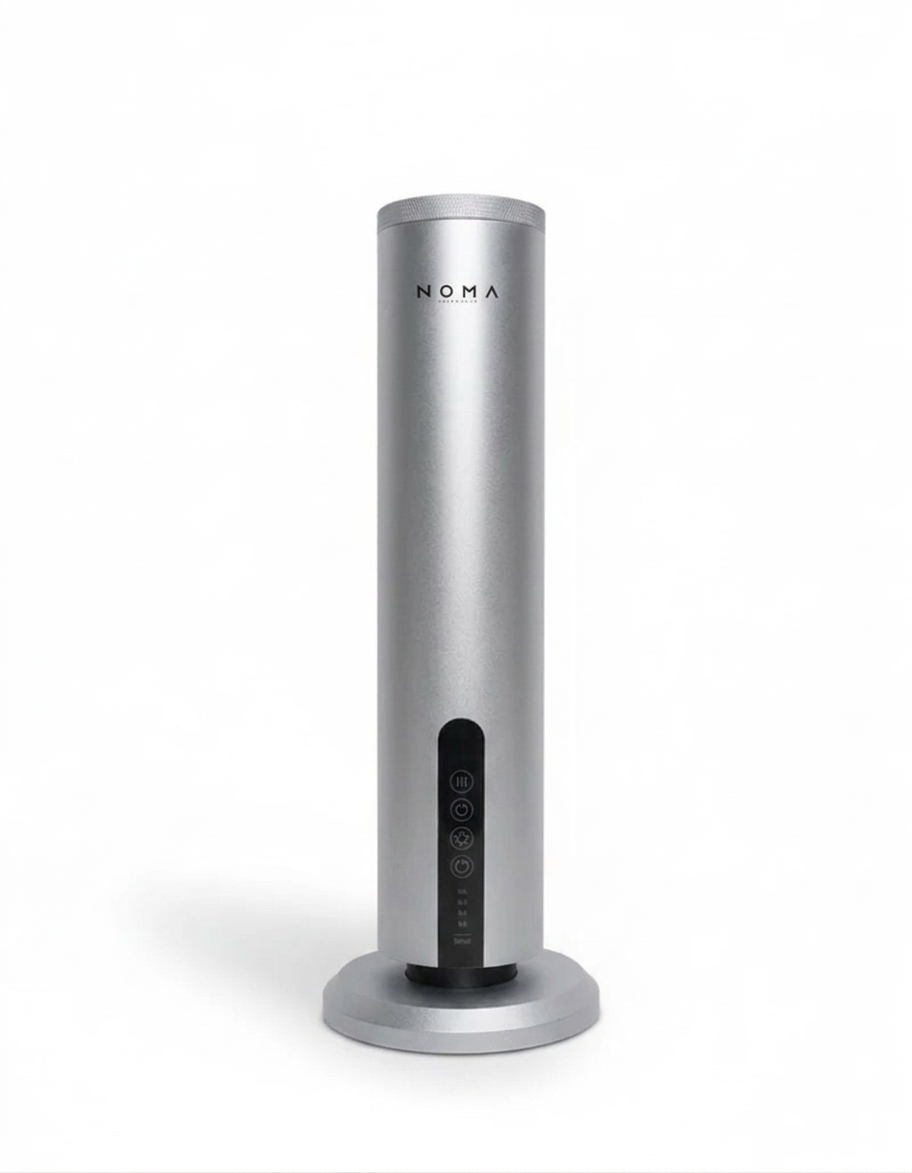
The Ultra 'Elevate' Silver Diffuser is designed to transform any space into a refined sensory experience. Crafted with premium materials and powered by advanced cold-air diffusion, it delivers a pure and consistent aroma mist, without the use of heat or water. Whether it’s a home, office, hotel suite, or retail environment, the Ultra Elevate enhances your surroundings with elegance, performance, and quiet sophistication.
Designed for Modern Living
With its sculptural tower silhouette and aerospace-grade aluminum body, the Ultra Elevate Diffuser stands as both a statement piece and a high-functioning fragrance system. The diamond-pattern texture, warm ambient lighting, and metallic finish bring a touch of contemporary luxury to any room.
Advanced Diffusion Technology
At its core is a next-generation twin-fluid atomizing system that transforms pure aroma oils into ultra-fine particles, allowing scent to disperse evenly across spaces up to 100m². Operating at a whisper-quiet 39.5 dB, the Ultra Elevate maintains serene ambiance while providing powerful, consistent fragrance delivery.
Smart Control at Your Fingertips
Enjoy effortless control and personalization through intuitive on-device touch functions or Bluetooth-enabled app connectivity. Create your ideal atmosphere with ease, anytime, from anywhere in your home.

At NOMA Lifestyle, we take great care to ensure the quality of our products. Please review our policy carefully before making a purchase, as all sales are subject to the terms below.
No Returns
Noma Lifestyle operates a strict no-return policy. We do not accept returns for refunds due to change of mind, incorrect purchases, or general dissatisfaction once an order has been placed.
However, selected products may be eligible for exchange under the conditions outlined below.
Damaged Items on Arrival
If your product arrives damaged, you must notify us within 6 hours of receiving your package.
- Claims reported after this timeframe will not be accepted.
- Proof of damage (including clear photos and/or videos of the product and packaging) will be required for assessment.
Faulty Smart Diffusers
If your smart diffuser is faulty or not operating correctly, you must notify us within 24 hours of receiving the product.
- You will be required to return the diffuser to us for inspection.
- Once received, our team will assess the product to confirm the fault.
- If the fault is approved, an exchange will be issued or you will be refunded a credit voucher to be used at Noma Lifestyle.
Sold-Out Items
In the event that an approved exchange item is sold out, you will be issued a NOMA Lifestyle credit voucher.
- The credit voucher may be used to purchase any product available on our website.
- Credit vouchers are non-refundable and cannot be exchanged for cash.
Scent Exchanges (Reed Diffusers, Candles & Fragrance Oils)
Reed diffusers, candles, and fragrance oils are eligible for exchange only if the scent is not the customer’s preferred fragrance.
The following conditions apply:
- Exchanges are permitted once per order and are not eligible for refunds.
- The customer is responsible for all return and re-delivery shipping costs.
- Products must be unused, unopened, and returned in their original packaging.
- Items returned without original packaging or showing signs of use will be rejected and returned to the customer at their expense.
Important Notes
- All claims must be submitted within the specified timeframes.
- Failure to comply with these requirements may result in the claim being declined.
- NOMA Lifestyle reserves the right to refuse any claim that does not meet our policy conditions.
For assistance, please contact our customer support team as soon as possible after receiving your order.
Noma Lifestyle
Quality. Intentional Living.
At Noma Lifestyle, we proudly deliver worldwide using trusted international courier partners including DHL and FedEx.
Processing Time
All orders are processed and dispatched within 1–2 business days after payment confirmation. Orders placed on weekends or public holidays will be processed on the next business day.
Local Delivery within Ghana
Standard Delivery
All orders are delivered next day except holidays and weekends.Orders are delivered through the course of the day between 9:00am and 18:00pm.
Delivery fees will be shown at the checkout.
Express Delivery
Your order is given priority on the day of delivery which is next day(except weekends and holidays). Your Order will not be included with general orders but separately picked up and brought straight to you.
Delivery Time:
Monday - Saturday between 9:00am till 18:00pm.
Orders placed on Friday will be delivered on the next working day (Except holidays).
International Delivery
We currently ship to:
- United States
- United Kingdom
- Europe
- Africa
- Australia
- Asia
Estimated delivery time is 5–7 business days from the date of dispatch. Delivery times may vary depending on customs clearance procedures, destination country, and local courier operations.
Shipping Partners
To ensure your order arrives safely and efficiently, we use reputable global carriers including:
- DHL Express
- FedEx
Once your order has been dispatched, you will receive a shipping confirmation email containing your tracking information.
Customs & Duties
International orders may be subject to customs duties, taxes, and import charges imposed by the destination country. These charges are the responsibility of the customer and are not included in the shipping fees charged by Noma Lifestyle.
Shipping Fees
Shipping costs are calculated based on your destination and order weight and will be displayed at checkout before payment is completed.
Delivery Delays
While we strive to meet all estimated delivery times, Noma Lifestyle cannot be held responsible for delays caused by customs inspections, weather conditions, courier disruptions, or other circumstances beyond our control.
Choose options